
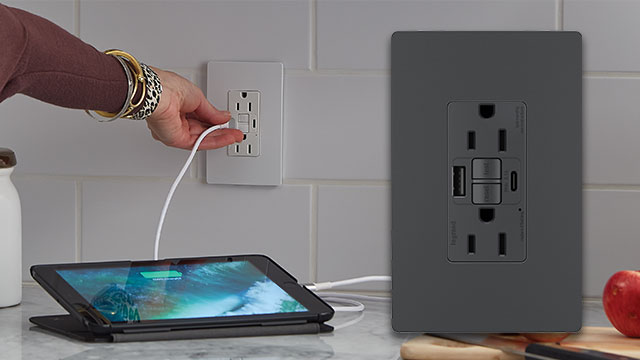
When you’re upgrading your home’s electrical system or planning a renovation, two outlet types should be at the top of your list: USB outlets and GFCI outlets. They both serve very different purposes — one adds convenience, the other adds life-saving safety — but they’re equally essential in a modern home.
In this guide, we’ll explore:
- What USB and GFCI outlets are
- How they work
- Where to install them
- Whether you can combine them
- Pros and cons of each
- National Electrical Code (NEC) requirements
- Installation considerations
🔌 What Is a USB Outlet?
A USB outlet is a wall socket that includes built-in USB ports along with traditional electrical plugs. These USB ports (commonly USB-A and now increasingly USB-C) allow users to charge electronic devices directly without using bulky adapters.
📱 Common Devices Charged Through USB Outlets:
- Smartphones
- Tablets
- Bluetooth speakers
- Smartwatches
- E-readers
- Wireless headphones
- Rechargeable batteries (AA/AAA)
Modern USB outlets often come with fast-charging technology, including Power Delivery (PD) and Quick Charge (QC), which can drastically reduce charging time.
⚡ What Is a GFCI Outlet?
A GFCI (Ground Fault Circuit Interrupter) outlet is designed to protect you from electrical shocks by monitoring the flow of electricity through the circuit. If it detects a loss of current — even as small as 4-5 milliamps — it shuts off the power instantly to prevent electrocution.
💧 Where Are GFCI Outlets Required?
According to the National Electrical Code (NEC), GFCI protection is required in any location where water and electricity may come into contact:
- Bathrooms
- Kitchens (countertops within 6 feet of a sink)
- Laundry rooms
- Garages
- Basements
- Outdoors
- Utility rooms
- Crawl spaces
⚠️ Code Note: GFCI outlets are not optional in these areas. Failing to install them during renovations or new builds can result in code violations and serious safety risks.
🧠 USB Outlets vs. GFCI Outlets: Key Differences
| Feature | USB Outlet | GFCI Outlet |
|---|---|---|
| Primary Function | Device charging via USB | Electrical shock protection |
| Safety Features | Minimal (depends on manufacturer) | Cuts power during electrical faults |
| USB Charging Ports | Yes (USB-A, USB-C) | No (unless hybrid model) |
| Reset Function | No | Yes (“Reset” and “Test” buttons) |
| Where Used | Minimal (depends on the manufacturer) | Bathrooms, kitchens, outdoors |
| Required by Code? | No | Yes in wet/high-risk areas |
| Average Cost | $20–$40 (standard USB models) | $15–$30 (standard GFCI) |
💡 Can You Combine USB and GFCI in One Outlet?
Yes. Hybrid GFCI+USB combo outlets are now available and becoming popular. These outlets:
- Offer built-in ground fault protection
- Include USB ports for device charging
- Are ideal for kitchens, bathrooms, garages, and outdoor areas where both safety and convenience are needed
💰 While more expensive (typically $40–$70 per outlet), these hybrid units save space and reduce clutter by eliminating the need for separate USB outlets in protected areas.
Alternatively, if your USB outlets are on a GFCI-protected circuit (such as controlled by a GFCI breaker in your panel), they are also considered protected even without being GFCI themselves.
🛠️ Where to Install USB Outlets
Here are some smart placements for USB outlets throughout your home:
🛏 Bedrooms:
- Bedside walls or nightstands for phone/tablet charging
- Desk area for laptops or smart devices
🛋 Living Rooms:
- Behind couches or entertainment units
- Near coffee tables for guest device charging
🍽 Kitchens:
- Above countertops (away from the sink if not GFCI-protected)
- On islands for quick phone charges
🧑💻 Home Offices:
- On or near the desk
- Integrated into bookshelves or workstations
✈ Travel or Rental Properties:
- Ideal in guest rooms or Airbnbs to avoid complaints about missing chargers
🌧 Where to Install GFCI Outlets
You should install GFCI outlets in all NEC-required zones and anywhere moisture or water is likely to be present. Here are some examples:
🛁 Bathrooms:
- Near the vanity, sink, and even mirror-mounted appliances
🍽 Kitchens:
- On all outlets servicing countertop areas within 6 feet of the sink
🚪 Garages:
- Especially where you use power tools or where water might enter
🌧 Outdoor Areas:
- Patios, decks, and exterior walls for landscape lighting or garden equipment
🧺 Laundry and Utility Rooms:
- Where washers or utility sinks are located
⚖️ Pros and Cons of Each
✅ USB Outlets – Pros:
- Convenient charging
- Reduces the need for bulky adapters
- Helps declutter countertops
- Often includes fast charging tech
- Some have built-in surge protection
❌ USB Outlets – Cons:
- Not suitable for wet environments (unless GFCI-protected)
- Ports may wear out over time
- May need upgrades as USB tech evolves (USB-C, PD, etc.)
✅ GFCI Outlets – Pros:
- Life-saving safety
- Required by building code
- Easy to reset
- Affordable
- Long lifespan
❌ GFCI Outlets – Cons:
- Doesn’t provide charging convenience
- Can trip unnecessarily if miswired
- Slightly more complex to install
🧰 DIY or Hire a Pro?
If you’re comfortable with basic electrical work and have experience replacing outlets, USB and GFCI outlet installation is a manageable DIY task. But make sure:
- You turn off the power at the breaker
- You test wires with a voltage tester
- You understand wiring diagrams (especially for GFCI)
If you’re unsure or the wiring is old/confusing, always hire a licensed electrician. This is especially true for:
- GFCI outlets near water sources
- Combo units with USB and GFCI
- Multi-outlet circuits requiring line/load understanding
🧯 Safety Tips
- Test GFCI outlets monthly using the “Test” and “Reset” buttons
- Don’t overload USB ports with power-hungry devices (check amperage)
- Replace GFCI outlets every 10 years or sooner if they stop working
- Use tamper-resistant outlets if you have kids at home
🏁 Final Thoughts: Install Both for a Safer, Smarter Home
If you’re only installing one type of outlet, you’re missing out. GFCI outlets protect, and USB outlets power convenience. Together, they create a modern, safe, and highly functional electrical setup in any home.
Whether you’re upgrading an old property or building your dream home from scratch, think beyond traditional outlets. A small investment in modern electrical outlets can improve:
- Your daily convenience
- Your home’s safety
- Your compliance with electrical codes